

- Google Wallet now lets you track parcels
- It also now includes TSA PreCheck Touchless ID
- But these features only work in the US
Google Wallet is becoming a lot more than just a wallet, as two new features have just rolled out for it — one of which helps you track parcels, and the other of which could speed your journeys through airports.
First up, there’s now the ability to see receipts, tracking numbers, and the shipping status of parcels you’re waiting for, directly from Google Wallet. For more detailed tracking information you’ll still have to head to the carrier’s website, but a new ‘track package’ button in Wallet will take you straight there.
You’ll see all deliveries that are due soon alongside your passes on the Google Wallet home screen, while your other orders can be seen by tapping ‘view more’.
That said, all of this will of course only appear if your order is linked to your Gmail account, and even then, only if it’s from a supported merchant. You’ll also need to have package tracking enabled, which can be done from the Gmail app on your phone by heading to Menu > Settings, then tapping your account name, followed by General > Package tracking.
So it’s not quite a comprehensive package tracking solution, but it’s a good step in that direction — though right now this feature is only available in the US.
A travel upgrade
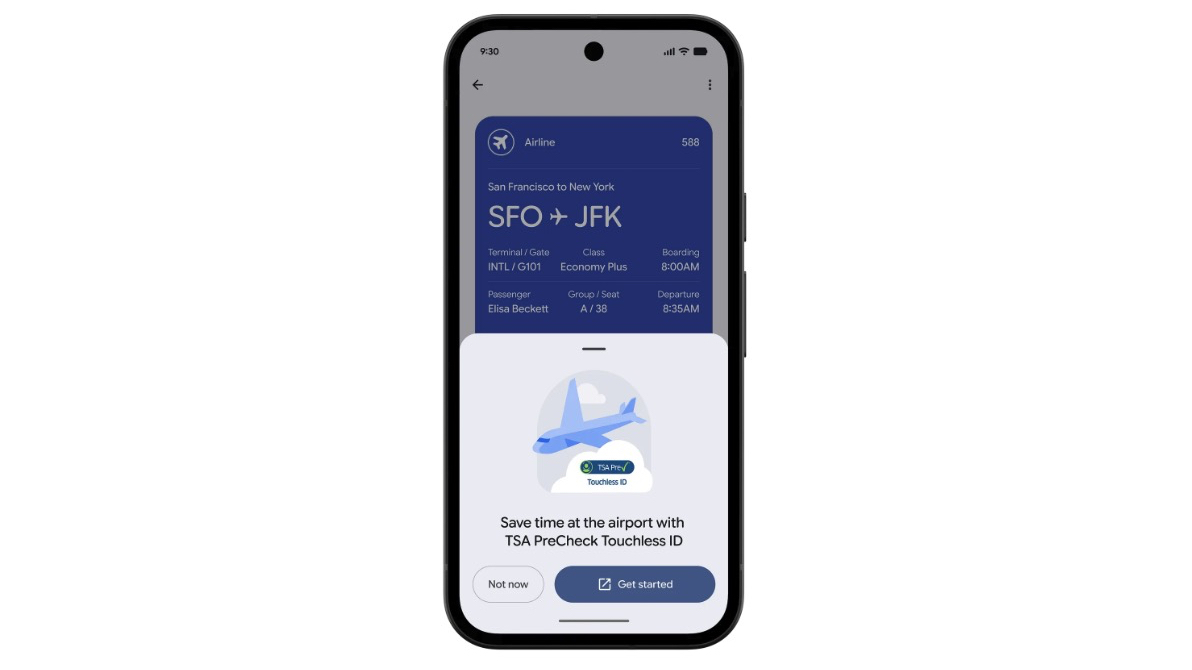
As for the other new Google Wallet update, it has become the first digital wallet to support TSA PreCheck Touchless ID. This means that rather than having to show your ID at security, you can pre-register with the TSA through Google Wallet.
If you’re eligible, you can do this by first creating an ID pass in Google Wallet using your passport information, and then adding a boarding pass to Google Wallet. You’ll then see a ‘get started’ button on the pass that allows you to securely share your ID and boarding pass with the TSA.
Once done, you’ll be able to use the express TSA PreCheck Touchless ID line at the airport, saving you time.
However, this currently only works at 65 US airports and with 100 participating airlines, so while it’s quite widespread it won’t work on all flights from all US airports.
![[Aggregator] Downloaded image for imported item #147887](https://kcmicro.com/wp-content/uploads/2026/06/PsKsyJ5xc78x7rTfEX3QRm-1280-80-800x500.jpg "[Aggregator] Downloaded image for imported item #147887")
![[Aggregator] Downloaded image for imported item #147772](https://kcmicro.com/wp-content/uploads/2026/06/TSBaeifGq43SqzpdT3tCGX-1280-80-800x500.jpg "[Aggregator] Downloaded image for imported item #147772")
![[Aggregator] Downloaded image for imported item #147863](https://kcmicro.com/wp-content/uploads/2026/06/fL8Ba8CiJjt2qsAVpr6UmK-1280-80-800x500.jpg "[Aggregator] Downloaded image for imported item #147863")